Macro Kingdom II

For various reasons, I rarely post videos from others on the blog, focusing instead on creating original content. Yet, I can’t resist the urge to show you this clip from Clemens Wirth. The guy is super creative and mix 5DMrkII footage with visual effects perfectly.

I asked Clemens to share some tips and he gladly accepted.

He shot almost everything with the Canon MP-E 65mm f/2.8 1-5X Macro (this one was easy to guess) with one sequence from the 100mm f/2.8 Macro. He also used the Z-finder to achieve critical focus. Having played with macro videography in the past, I was curious about his lighting setup and I was quite surprise by its simplicity: two 100 watts bulbs for indoor shots and the sun for the rest!

For those who never saw the MP-E 65, it is a manual focusing lens with a macro ratio of 5:1. As far as I know, it is the only commercial lens with such a magnification factor. While hard to use, it can produce some incredible results as Clemens showed us.

DeliciousStumbleUponDiggTwitterFacebookEmail

A better backup strategy

Last week, Chase Jarvis published a very popular article about his workflow/backup strategy. The article was retweeted and by many and commented by Vincent Laforet who gave it his nod of approval.

Well, I am not the kind of guy who is impressed by cool charts and I found two flaws in Chase workflow.

Flaw 1: Archive the cards, not the file!

First, I would remove Aperture from the On Location process. A better way to import data from CF Card is to create disk images of these cards. This is a trick I picked from the book From Still to Motion. It is a better way to organize files by keeping all related data in the same place (DMG). Also, if you archive the physical cards, it makes the matching of virtual archives to the physical ones trivial. I never really though about keeping CF Cards until Shane Hulrbut mention it and with the decreasing cost of CF cards, it makes a lot of sense.

Flaw 2: Live work backuped with Time Machine? WTF!

First off, don’t get me wrong. Time Machine is good, very good. It is a set and forget kind of thing: it will backup files that have changed between two drives every x minutes. That is its strength but also its weakness: it does the copy based on time and not on milestones.

Lets take a worst case scenario: Time Machine just copied your project, then you decide to make three variations of one of your file. A few minutes later, you are done and while waiting for the automatic backup to happen, disaster strike: HD failure!

Here is another scenario: in the span of an hour, you modify a file three times then realize that you need version #2 which was not backuped by Time Machine (it saved #1 & #3). What can you do?

These are two example of how time based backup can (and will!) fail. While they are very good a copying stuff when you would not think about it, they dont have a notion of what is important for you to backup. Losing an hour of work on a file does not always mean that you will be able to get it back by spending another hour on it. Creativity and inspiration are not a function of time.

The classical approach to this kind of problem is to “save as” every minute and create a multitude of copies of a single file and manually backup this file on another drive. Not very practical.

Fortunately, there is a better solution. It is free, powerful and easy to use! And you know the best part? You don’t even need a complex IT infrastructure to make it work. I would never dare to say that I am the first to think about it, but according to Google, I am the first to blog about it: using GIT as a version control/backup system for your visual assets!

What is GIT

GIT is a distributed code versioning system. It is used by programmers to keep an history of all the modifications done to each file and distribute these files/change. In plain English, it means that it tracks changes to files, can go back to any milestones in its history and can apply all the modifications done on workstation to all the others.

GIT is the industry standard in the IT field and while its features set is an overkill, its performance and ease of use makes it a mandatory tool for every paranoid virtual asset owner.

How to use GIT

Understanding how to use GIT is out of the scope of this article. I am planning to publish a detailed article on the subject soon. If you can’t wait, and want your work to be meteor-proof, go take a look at the GIT Ready website. While the content is targeted at programmers, it will teach you the basics (tips: just read the sections about the init, add, commit, push and clone commands).

Conclusion

If there is one thing I hope you learned from this post is that a full featured backup solution is not simply about having multiple copy of your (RAW) files in various location. That is only part of the equation (which is fully covered in Chase video). The other part is making sure that you will also be able to access the version (live work) that is important to you (which I will cover in an upcoming article).

DeliciousStumbleUponDiggTwitterFacebookEmail

Music video shooting tips

I have been working real hard for the past few weeks on a music video we shot for one of my friend. I shot a few clips for him in the past (the single camera on tripod kind of thing) but this time, he wanted something more. Since I am always up for a new challenge and I was totally naive about the amount of time it would take to shoot the clip, I accepted.

While the whole thing could have been done in a weekend under perfect circumstances (and a bit more experience and preparations), we did a few mistakes that really made it harder to do the edit.

Since I am the kind of guy who loves to show my errors in front of thousands of people, I thought it would be a good idea to make a list of all the things I learned so it could help anyone who would be crazy enough to start the same endeavor!

Note: a lot of these tips are targeted at people crazy enough to do clips which require lip sync. If you can keep the images and the music separated, things will be much easier.

Planning

Having a plan in your head is good, but not enough. Music video are all about timing and if you dont want to end up with blanks in your sequence that you wont know how to fill, make sure you have a storyboard covering the whole clip! In my case, I totally forgot to get something to cover the bridge section of the song, 32 seconds of nothingness… I guess it is good to stir creativity.

Syncing

If you can find a clip concept where you can get away with lip syncing, do it! It is a huge time sink. That being said, in the case you have to show the singer actually singing, here are a few pointers:

  • Shoot with as many camera as you can (see below)
  • Prepare a MP3 version of the song with a very loud and short BEEP at the start and end.
  • Use an electronic slate to sync the various camera together (in case because the audio is not never perfect)
  • dont start editing until you have trimmed and synced all your clips

Shooting

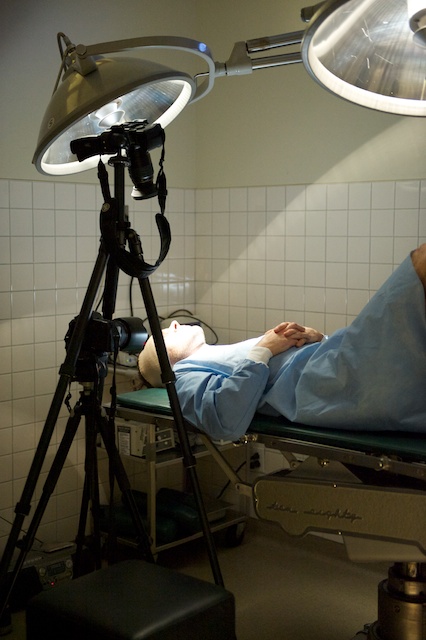
Bring as many camera as you can! In our case, we only had 2 5DMrkII and I wish we had at least one more. The more coverage you have of each sequence, the easier it will be once you are in the edit room. For Traumatic Head Injury, I decided to focus mostly on the head so we shot a few versions with a close up cam on Jon face (using a 100mm Macro and 24-70L2.8) and the other camera right on top of him. Here is a picture of the ghetto setup we had.

The shooting settings were f4 to 5.6, 1/50 sec at between ISO 800 and 1600. Shooting with a wider aperture would have been asking for trouble since it was already hard to manage the depth of field. I would strongly advice you to use zooms when working in tight spaces since they make framing so much easier.

Framing

Don’t capture the singer lips unless you have too. This way, you can reuse sequences in other part of the clip and no one will ever notice. Also, in a multicam setup, make sure there is a significant change in the point of view from one cam to the other, else it just feels weird when jumping points of view.

Lighting

We shot the clip with minimal gear. We only had two cameras, two tripods, a slider and three lenses (50mm, 24-70L & 100macro) but no lights. Fortunately, the surgery lights were quite good but I wish we had a few more to put at the back of the ‘surgeon’ to have a nice outline. Actually, if there was one piece of gear that I would have rented for this shoot, it would have been a few small spot lights, preferably LED to not eat the place too much.

Location / preparation

Location is important. We had access to a surgery room and I think it really contributes to the feel of the clip. I wish we could have used more of it. For example, I wish we had a shot of the stretcher coming in the surgery room for the intro sequence, or as a dreamy sequence in the bridge section.

Unfortunately, all these good ideas are worthless if you can’t execute them! So make sure you visit the location a few days before and give yourself enough time to come up with concepts and shots.

Consistency

If you are going to shoot multiple take of a scene, make sure everyone does the same thing every time. And if you see the singing head at the same time, make sure the actions always happen at the same time. This may sound obvious but it is so hard to execute perfectly. We had a lot of issues with this for our clip, so much that maybe 40% of the footage was unusable because of a lack of consistency.

The solution (that I figured afterward) is to have someone narrating the actions as they are coming while watching the initial shot on a laptop.

Editing

My first idea was to assemble all my clips as a single multi-clip in FCP and cut from there. Unfortunately, it did not work, my machine was not able to manage the 16 simultaneous HD sequences, even with a RAID-0 of 2 VelociRaptor. My next approach was to create small resolution proxies but, there again, 16 feeds were too much so I gave up and stacked all the sequences in the timeline and cut from there. If anyone has advices regarding this, I would love to hear from you!

What I would have done differently?

Lots of things, but the one thing that hurt me the most which I could not fix once in the edit room was the lack of coverage of some parts of the song. At the beginning of the clip, I am forced to cut on the beat while I know (as most of my friend told me) that it would have been better to be off beat for a few cuts to increase intensity and expectations.

Unfortunately, I couldnt because I would not have had enough footage to make each shot look different. This is why getting coverage is important and you can never have enough cameras filming at once! Never!

Conclusion

I have shot films, wedding video, travel and corporate video and let me tell you: music video are the hardest! If you are getting paid to to it, make sure you allocate 2-3x more time for edits and don’t sell yourself short. I am sure there is a lot of money to be made shooting music video with HDSLR, but that is something I will leave for others!

The result

Here is the first minute of the clip. The current grading is a place holder, made under a minute in Magic Bullet Mojo, until the final style is applied.

DeliciousStumbleUponDiggTwitterFacebookEmail

Sonic Fire sound clip on sale

I will be reviewing Sonic Fire Pro soon,  until then, you can download the free Express Track version to play with it and get some single track for only 9.99$ (normal price is 30$ each). This is a great rebate and a good opportunity to stockpile tracks for the next year. Each of these tracks can be used in a multiple of ways which make them great value. Go take a look.

Sales end June 9.

What is Sonic Fire?

It is an audio clip editor that uses special smart sound clips to make editing easier. Audio clips automatically adjust to fit the desired duration and you can add/remove instruments or change the mood when ever you want while staying within the same track. In short, the perfect tool to get a good soundtrack when you dont know anything about scoring!

DeliciousStumbleUponDiggTwitterFacebookEmail